Error Handling
When an error occurs inside TTS it will be printed to the console and show a pop at the bottom of VS Code.
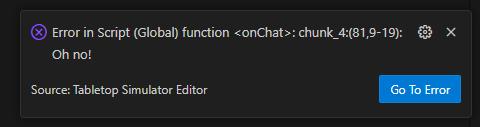
The popup also has a button which allows you to open the file and line where the error occured. There’s also the command "Go to Last Error" which opens the file where the last reported error occured, which is the same as clicking the button on the last shown popup.
How the line is found
TTS reports the line in the script it ran. For bundled scripts that is the bundled copy in .tts/bundled, so the extension works out which `require`d module the line belongs to, finds that module’s file through the include paths, and opens it at the matching line.
If you edited the file after the last Save and Play, the line numbers no longer match what TTS ran.
The extension then looks for the failing line’s text in the file, using the lines around it to tell apart repeated lines such as end, and opens it where it moved to.
When the line is gone or cannot be told apart, it opens the bundled copy at the exact line TTS reported instead, and says so.
The button is not shown for errors without a line number, or for errors in code run with Execute Lua (including AI agents through the MCP server), since that code is not stored in any file.